Mailchimp pricing in 2026 depends on your plan and how many contacts you store. The starting price applies to a specific contact limit. This guide uses prices published on Mailchimp’s pricing page or in its help center. If Mailchimp doesn’t publish a price for your contact count, check its current pricing. You can’t estimate it by multiplying the $13 starting price. You choose how many contacts to store. That choice sets the contact limit, the monthly send limit, and the bill. We checked Mailchimp’s pricing page for these prices on 25 November 2026. The help article About Mailchimp Pricing Plans is the source for who counts and what each plan includes.
How much does Mailchimp cost in 2026?
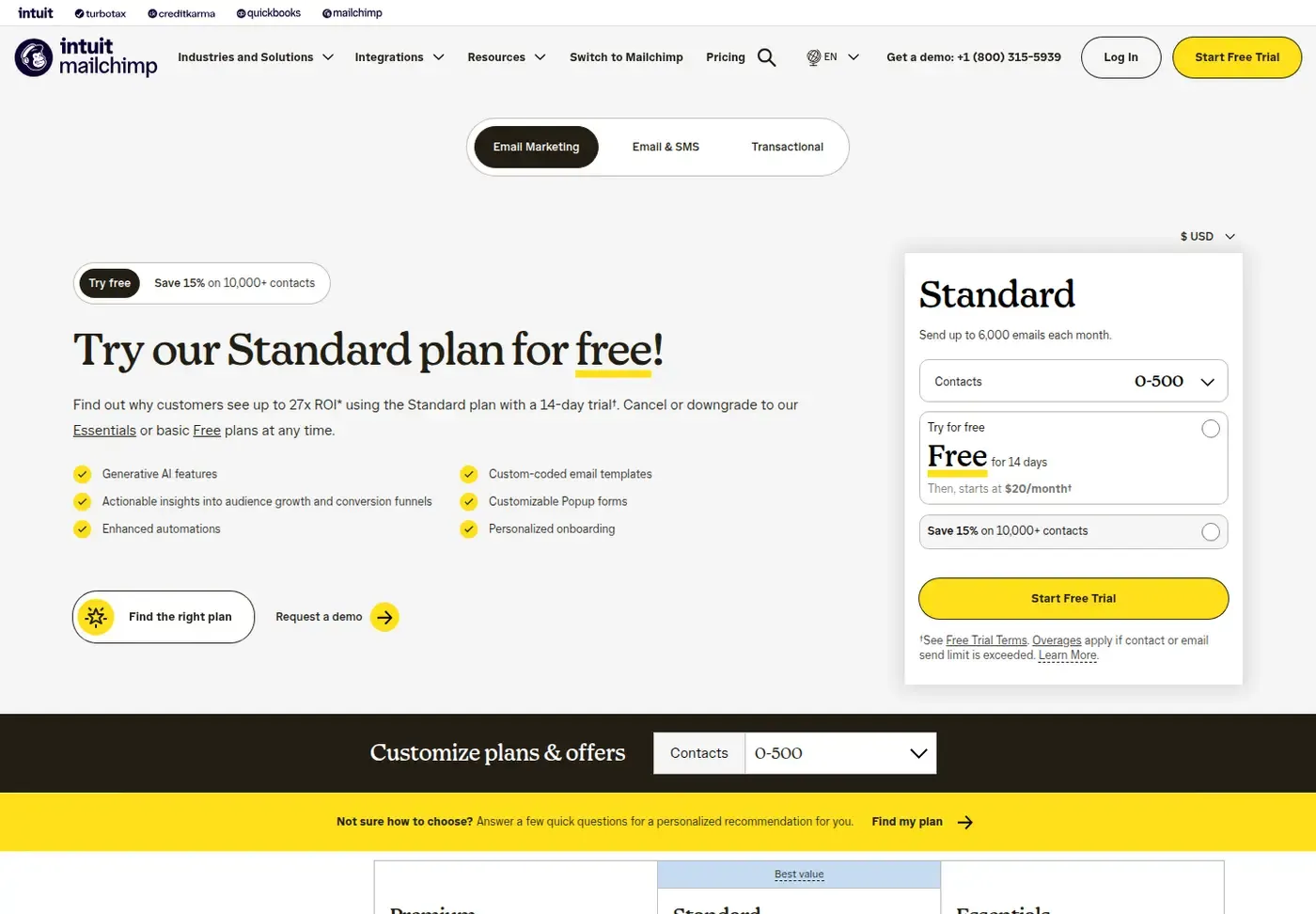
Both figures are published starting prices for a list of up to 500 contacts. Essentials starts at $13 a month. Standard starts at $20 a month. Both were on the marketing pricing page as “starts at” prices on 25 November 2026. The same page shows a 15% offer for the first 12 months at 10,000 contacts or more, and other introductory offers. Those change the first invoices. They are not the renewal rate.
Premium starts at $350 a month on that same page. The help article says the Premium base includes 10,000 contacts, and that Premium can store up to 200,000. Other Premium tiers are not a static table. Check current pricing for a Premium list that is not the base.
Free is $0. It is a separate plan with a hard stop at 250 contacts and 500 sends a month.
| Plan | Starting price | Contact note | Monthly sends |
|---|---|---|---|
| Free | $0 | Up to 250 contacts | 500 a month, and 250 a day |
| Essentials | $13 a month | Starts at up to 500 contacts. Stores up to 50,000. | 10 × the contact limit |
| Standard | $20 a month | Starts at up to 500 contacts. Stores up to 100,000. | 12 × the contact limit |
| Premium | $350 a month | Base includes 10,000 contacts. Stores up to 200,000. | 15 × the contact limit |
Above 200,000 contacts, Mailchimp says it will customize a plan. That quote is not a list price.
A contact limit is the maximum you can store at any point in the billing cycle. If a paid account goes over the limit, Mailchimp does not stop the campaigns. It adds a charge. If the jump is permanent, you move the tier. If it was a spike, you lower the audience and keep it lower for a full billing cycle to avoid the extra charge again. On Free, crossing 250 contacts holds live sends and test sends until you upgrade or remove contacts. You can still edit emails and collect new people while the hold is on.
Source: mailchimp.com/pricing/marketing/, checked 25 November 2026. Not a quote for 5,000 or 10,000 contacts on Essentials or Standard.
| Platform | Monthly price | Note |
|---|---|---|
| Free | $0 | 250 contacts |
| Essentials | $13 | Up to 500 |
| Standard | $20 | Up to 500 |
| Premium | $350 | Starts at |
Is Mailchimp free? Free plan limits in 2026
Yes. Mailchimp’s free plan lets you store up to 250 contacts and send up to 500 emails per month, with a daily limit of 250 emails. It includes one audience, one user seat with Owner permissions, a limited selection of templates, and basic reporting. You can also try landing pages and forms. Email support is available for the first 30 days.
Free plan limits in 2026 are hard caps. When the contact total passes 250, Mailchimp places a hold on live emails and test emails. Scheduling is not included. Marketing automation flows are not included. Generative AI features on the pricing table are not included. Custom-coded templates can be created, and sending them requires a paid plan. The Mailchimp logo stays until a paid plan that removes it.
The free plan is a fit when the list is still under both caps and you are sending a simple campaign, not a sequence. A weekly letter to 200 people is about 870 emails a month, which is already over the 500-send cap, so the free plan does not cover a weekly letter even when the headcount is under 250. A monthly letter to 200 people is about 200 sends and does fit. That is the practical free plan limit, separate from the contact cap.
Mailchimp free plan accounts that import a larger list stop sending until the contact total is back under 250 or the account is on a paid plan. Archiving, cleaning, and deleting are the removals that drop the count. Unsubscribing someone does not.
Mailchimp Essentials vs Standard vs Premium
Mailchimp plans are four marketing plans: Free, Essentials, Standard, and Premium. The pricing plans for 2026 differ by seats, audiences, automation length, and support, not by a separate “newsletter” product. The features comparison below is the marketing pricing page and the help article, checked 25 November 2026.
Essentials starts at $13 a month for up to 500 contacts and can store up to 50,000. The monthly send limit is 10 times the contact limit. The help article lists 3 audiences, 3 seats with Owner and Admin permissions, single email automations, automation flows of up to 4 steps, all Mailchimp email templates, A/B testing, scheduled sends, and 24/7 email and chat support. SMS is an add-on in select countries, not a line in the $13. The Essentials lander says the Mailchimp logo can be removed. Custom-coded templates can be created. Sending them is a higher plan.
Standard starts at $20 a month for up to 500 contacts and can store up to 100,000. The send limit is 12 times the contact limit. The help article lists 5 audiences and 5 seats, with Owner, Admin, Author, or Viewer roles. It lists expanded automation flows, advanced segmentation, custom-coded templates, multivariate testing, custom reports, one onboarding session, and 24/7 email and chat. The pricing page describes Standard and Premium flows as up to 200 steps, with branching. Generative AI is included on Standard at no extra cost, in the countries and languages Mailchimp lists. SMS with MMS is an add-on in select locations. A 14-day trial of Standard or Essentials is the offer on the pricing page for eligible new customers and recent Free accounts. The trial is not the renewal price.
Premium starts at $350 a month. The help article says the base includes 10,000 contacts, storage runs to 200,000, and the send limit is 15 times the contact limit. Audiences are unlimited. Seats are unlimited, with Owner, Admin, Author, Manager, or Viewer roles. Phone support and longer onboarding are included. Above 200,000 contacts, the plan is custom. The $350 figure is the starting price, not a promise that 50,000 contacts still costs $350. Check current pricing for any other Premium tier.
Pay As You Go sits beside these plans. It uses the Essentials feature set and sells credits instead of a monthly contact tier. Use it when you send a few times a year. The credit price is on the pricing page. The help article describes the plan and does not print a per-credit dollar.
| Feature | Free | Essentials | Standard | Premium |
|---|---|---|---|---|
| Starting price | $0 | $13 a month | $20 a month | $350 a month |
| Contacts at that price | 250 | 500 | 500 | 10,000 on the base |
| Maximum contacts | 250 | 50,000 | 100,000 | 200,000, then custom |
| Sends | 500 a month, 250 a day | 10 × the contact limit | 12 × the contact limit | 15 × the contact limit |
| Seats | 1 | 3 | 5 | Unlimited |
| Audiences | 1 | 3 | 5 | Unlimited |
| Automations | Not included | Up to 4 steps | Expanded, up to 200 steps on the pricing page | Same flow length as Standard, plus phone support |
| AI features | Not included | Not included | Included, no extra cost | Included, no extra cost |
Which plan fits depends on what you need it to do. Essentials fits a small list that needs a schedule, templates, and a short automation, and that can live with 3 seats. Standard fits when the journey is longer than 4 steps, when more than one person needs an author role, or when the reporting has to be custom. Premium fits a team that wants phone support and a base of 10,000 contacts, and that has already checked the $350 starting price against the tier the slider shows for their real contact total. A store that already runs on Mailchimp journeys is a reason to stay on Standard or Premium even when another sender is cheaper for a plain newsletter. The journeys do not export.
Who counts toward Mailchimp pricing?
Mailchimp pricing counts contacts stored in audiences, not subscribers you mailed this week. The help article defines a contact as any member of an audience. Subscribed, unsubscribed, and non-subscribed contacts are in the contact total. Archived, cleaned, and deleted contacts are not.
That is the usual surprise on a Mailchimp bill. A person who unsubscribed last year still counts until you archive them. A person you imported and never confirmed can count as non-subscribed. Cleaned addresses, the ones Mailchimp has marked after a hard bounce, do not count. Deleted contacts do not count, and deletion is not the same as archive. Archive is the reversible way to drop someone from the bill.
The contact total is everyone stored across all audiences, not the largest audience. Three audiences of 200 people are 600 contacts if none are archived. The contact limit is the ceiling you buy. Going over it on a paid plan adds a charge for that cycle. Staying over it means the next tier.
MailerLite, for a contrast on the same decision, bills active subscribers and says an address that was active at any point in the billing cycle still counts until the anniversary, even if you delete it early. See MailerLite pricing for that rule. Do not subtract your unsubscribes from a Mailchimp tier and expect the MailerLite number.
Tests count as sends. Transactional email counts toward the monthly sending limit. A test to yourself is one send. A campaign to 500 people is 500 sends.
What are the Mailchimp send limits?
The send limit is a multiple of the contact limit you bought, not of the people you actually emailed.
Essentials allows 10 times the contact limit. A 500-contact Essentials plan allows 5,000 sends. A higher Essentials tier allows 10 times that higher limit. Standard allows 12 times. Premium allows 15 times. Free has fixed caps: 500 sends a month and 250 a day, whichever you hit first.
For a weekly newsletter, monthly sends = subscribers × issues per week × 4.33. At 500 contacts and one issue a week, that is about 2,165 sends, inside both the Essentials and Standard allowances at the 500-contact starting price. A daily letter to the same 500 people is about 15,165 sends, which is over 10 times 500 and over 12 times 500. Daily sending at that size needs a higher contact tier, even if you only have 500 people, or it needs a plan whose multiple covers the month. For that higher tier, check current pricing.
Welcome emails, tests, and automation mail sit on top of the issue estimate. They are not in the 4.33 figure. On a tight month they are what pushes a plan over.
If a paid account hits the send limit, Mailchimp’s pricing page says it bills the overage rather than stopping the campaign, as long as the overage is paid. Free does not work that way. Free pauses sending.
Mailchimp nonprofit discount
The Mailchimp nonprofit discount is 15%. About the Nonprofit Discount, checked 25 November 2026, says verified nonprofit organizations and charities can request it. The discount is not retroactive. Create the account, then request the discount before you buy a marketing plan. Past purchases are not refunded to apply it later.
In the United States, add an EIN to the account before the request. Mailchimp may ask for a 501(c)(3) letter. Outside the United States, the request includes a link to the organization’s site, and Mailchimp may ask for more. The request path on the help page is the contact form: Topic, Billing, then Non-profit Discount Requests for the US or for international, then the contact form. Billing follows up if they need another document.
The 15% applies to the marketing plan you buy after approval. It is not a separate free tier, and it does not change who counts as a contact. A nonprofit with 2,000 stored contacts still needs the tier for 2,000 contacts. The page does not publish that tier. Check current pricing, then apply 15% only after the discount is on the account. Do not quote 15% off a number Mailchimp has not published.
Sales tax exemption is a different request. The nonprofit discount does not automatically remove sales tax. Mailchimp’s tax help says most states do not accept a 501(c) letter as proof of exemption.
How does Mailchimp pricing compare at 500 contacts?
At 500 contacts, Mailchimp’s published prices can be compared with other published starting prices. This is the only list size where Essentials and Standard have a dollar on the page. At 1,000, 4,000, or 10,000 contacts, check Mailchimp’s current pricing.
| At 500 contacts | Monthly list price | What the price is for |
|---|---|---|
| Mailchimp Free | Does not cover 500 contacts | Stops at 250 |
| Mailchimp Essentials | $13 | Up to 500 contacts, 5,000 sends |
| Mailchimp Standard | $20 | Up to 500 contacts, 6,000 sends |
| MailerLite Comfort | $12 | Up to 500 subscribers, 5,000 emails |
| Kit (ConvertKit) Free | $0 | Broadcasts, if you are under 10,000 subscribers |
| Flodesk Email | $46 | Any list size, monthly billing |
| Constant Contact Lite | Starts at $12 | Then varies by contacts. Check current pricing for 500. |
Kit (ConvertKit) Free is $0 for broadcasts up to 10,000 subscribers, so at 500 people a broadcast-only letter does not need Essentials. Creator, which adds sequences, is $39 a month up to 1,000 subscribers. beehiiv Free is $0 up to 2,500 subscribers and does not include automations. Substack is $0 to publish. MailCheap Starter is $19 a month for 20,000 emails and 10,000 subscribers, if the month fits that allowance. The MailCheap link is an affiliate link.
See MailCheap pricingMailchimp pricingThe MailCheap button is an affiliate link. The Mailchimp button is not. Commission does not change MailCheap’s price.
Pick Essentials when you need Mailchimp’s templates, a short automation, and a schedule, and 500 contacts is the real stored total. Pick Standard when the automation is longer than 4 steps. Pick Free when both the contact cap and the 500-send cap still hold. For a larger list, open the pricing page and read the tier. Do not multiply $13 or $20 by the size of the list. Mailchimp does not price it that way, and a guessed tier would be wrong.
FAQ
Does Mailchimp have a pay-as-you-go plan?
Yes. Pay As You Go is an alternative to a monthly marketing plan. You buy email credits when you send, and the help article says the plan uses the same feature set as Essentials. Mailchimp does not publish a fixed credit price on the help page. Check current pricing on the marketing pricing page before you treat credits as cheaper than Essentials.
Why is Mailchimp so expensive?
You pay for a contact tier, not for how many people you mailed this month. Subscribed, unsubscribed, and non-subscribed contacts all count until you archive, clean, or delete them. The published starting prices are $13 for Essentials and $20 for Standard, each for up to 500 contacts. Above that, the tier price is on Mailchimp's page, so a stored list of old contacts can move you into a higher tier than the list you actually send to.
Does Mailchimp have an annual plan?
The marketing pricing page says annual plans are available for Premium and for Standard plans at 10,000 contacts or more, and that you contact sales for the price and the eligibility. It does not publish a percent-off figure for that annual rate. Introductory discounts on the pricing page are promotions, not the renewal price.
Do unsubscribed or archived contacts count toward Mailchimp pricing?
Unsubscribed contacts count. Non-subscribed contacts count. Archived, cleaned, and deleted contacts do not. That rule is in About Mailchimp Pricing Plans. Archive people you will never mail before you accept a higher tier.
How much is Mailchimp above 500 contacts?
Check current pricing. Essentials starts at $13 a month and Standard at $20 a month, both for up to 500 contacts. Premium starts at $350 a month, and the help article says the Premium base includes 10,000 contacts. Essentials and Standard prices between those points are on the pricing page when you select a contact count. They are not a static table.
Is the Mailchimp free plan enough for a newsletter?
For a list under 250 contacts and under 500 sends a month, with a daily cap of 250, yes. One audience and one seat. Past either cap, sending pauses until you upgrade or remove contacts. Scheduling and marketing automation flows are not on the free plan.
View MailCheap pricing Back to the cost calculator Affiliate link. We may earn a commission. This does not change the price you pay. sendforless is not MailCheap.